Stretched Bar Display Explained: From Core Technology to Smart Buying Decisions
If you’ve recently explored digital signage, retail display systems, transportation screens, or embedded display solutions, chances are you’ve encountered the term Stretched Bar Display more than once.
But what exactly is it?
How is it different from a standard display?
And more importantly — what should you actually focus on when selecting one for a real-world project?
This guide breaks the topic down from three essential angles:
Technical fundamentals
Application scenarios
Practical purchasing logic
By the end, you’ll have a clear and structured understanding of how stretched bar LCD displays work — and how to choose the right one without costly mistakes.
1. What Is a Stretched Bar Display?
A Stretched Bar Display — also called a Bar-Type LCD, Ultra-Wide Display, or Strip Display — is a uniquely shaped LCD screen designed with an extremely wide aspect ratio.
Unlike traditional 16:9 displays, these screens are intentionally stretched horizontally while maintaining a slim vertical profile.
The result is a long, narrow display format ideally suited for environments where space is limited but visual communication remains critical.
Typical applications include:
Retail shelf-edge signage
Transportation information systems
Automotive dashboards
Smart appliances
Industrial equipment
Digital advertising displays
The Simplest Way to Understand It
Imagine taking a conventional widescreen monitor and trimming away most of its height while keeping the horizontal length intact.
That elongated visual strip is essentially what a stretched bar display looks like.
2. How Are Stretched Bar Displays Manufactured?
One of the most important things to understand is this:
Most stretched bar LCDs are not manufactured from entirely new custom mother glass.
Instead, they are typically produced by:
Starting with standard TFT LCD mother panels
Using precision cutting technologies
Reconfiguring the display into ultra-wide formats
This manufacturing method offers two major advantages:
Cost Efficiency
Using existing LCD production infrastructure significantly lowers manufacturing costs compared to developing entirely new panel architectures.
High Flexibility
Manufacturers can create multiple unconventional sizes and aspect ratios from the same base panel platform.
This is one reason why stretched displays are available in so many unusual dimensions.
3. The Five Most Important Specifications You Must Understand
3.1 Aspect Ratio — The Core Identity of a Stretched Display
The defining characteristic of a stretched display is its ultra-wide aspect ratio.
Common formats include:
21:9
32:9
48:9
16:3
And even more customized proportions
These formats are especially effective for:
Scrolling information
Shelf-edge advertising
Navigation systems
Transit information displays
Narrow installation environments
Practical Buying Logic
Always start with the physical installation space first.
Measure:
Available width
Available height
Viewing orientation
Then match the screen ratio to the installation constraints — never the other way around.
3.2 Brightness (Nits) — Determines Whether the Screen Can Actually Be Seen
Brightness is one of the most underestimated specifications in commercial display projects.
General Brightness Guidelines
| Environment | Recommended Brightness |
|---|---|
| Indoor retail shelves | 400–500 nits |
| Bright indoor storefronts | 700–1000 nits |
| Semi-outdoor environments | 1000–1500 nits |
| Direct sunlight outdoor use | 1500+ nits |
Some commercial stretched displays now reach 2500 nits, but higher brightness also introduces:
Increased power consumption
Higher thermal output
More demanding cooling requirements
Higher costs
Key Principle
More brightness is not always better.
For indoor applications, excessive brightness often wastes budget while increasing heat generation unnecessarily.
3.3 Operating Temperature — The Hidden Reliability Factor
In commercial and industrial environments, temperature performance becomes critical.
Many industrial-grade stretched displays support operating ranges such as:
-30°C to +85°C
This matters especially for:
Outdoor kiosks
Transportation systems
Vehicle integration
Enclosed metal cabinets
Poorly ventilated installations
Ignoring thermal requirements is one of the most common causes of premature display failure.
3.4 IPS vs TN Panels — Viewing Angle Changes Everything
Modern stretched displays increasingly use IPS technology because of its superior:
Viewing angles
Color consistency
Contrast performance
Typical IPS viewing angles reach:
178° horizontal × 178° vertical
This is essential for environments where viewers approach from the side, including:
Subway platforms
Retail aisles
Public corridors
Airports
If the display will be viewed from multiple directions, IPS is not optional — it is necessary.
3.5 24/7 Operation Support — Commercial vs Industrial Grade
Many buyers assume all commercial displays are designed for continuous operation.
They are not.
Commercial Displays
Typically designed for:
8–12 hours/day usage
Industrial Displays
Designed for:
24/7 continuous operation
Enhanced thermal management
Longer backlight lifespan
Higher motherboard reliability
Using consumer-grade or standard commercial displays in continuous-operation environments often leads to:
Backlight degradation
Overheating
Mainboard failures
Reduced lifespan
4. Where Are Stretched Bar Displays Used?
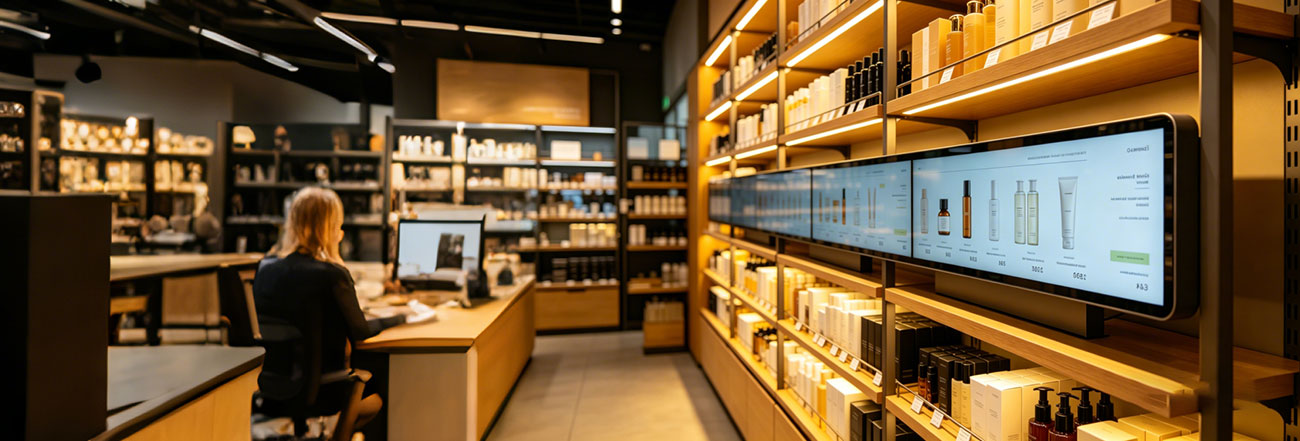
Retail Shelf Edge Displays
This is currently one of the largest application markets.
Because shelf edges provide limited vertical space, traditional displays often block products or disrupt store layouts.
Stretched displays solve this perfectly by delivering:
Pricing information
Promotions
Product videos
Dynamic advertisements
All while maintaining product visibility.
Cloud-based CMS systems also allow centralized content updates across multiple stores.
Transportation Systems
Transportation is another major market segment.
Applications include:
Train route displays
Bus information systems
Airport advertising
Taxi-top displays
Station guidance systems
These projects require:
Vibration resistance
Wide temperature tolerance
Industrial reliability
High IP protection ratings
In transportation projects, certifications such as EN50155 often become critical.
Automotive Dashboards
Modern vehicles increasingly use stretched LCDs inside digital cockpits.
Their elongated format is ideal for displaying:
Speed information
Navigation
Media systems
Vehicle diagnostics
while maximizing dashboard design efficiency.
Smart Appliances
Premium home appliances increasingly integrate slim bar displays for:
Temperature control
Status indication
Recipe guidance
Smart home interaction
Examples include:
Refrigerators
Coffee machines
Ovens
Washing systems
Industrial & Medical Equipment
Industrial HMI systems and medical devices often require compact but highly readable displays.
Typical applications include:
Medical analyzers
Elevator systems
Industrial control panels
Vending machines
Automation systems
In these sectors, long-term product availability and reliability become extremely important.
Many industrial buyers require:
3–5 year supply guarantees
Industrial certifications
Stable panel sourcing
5. A Practical Five-Step Buying Framework
Many buyers start by comparing prices.
That is usually the wrong approach.
Here is a far more effective decision-making framework.
Step 1 — Define the Installation Environment
Always begin with:
Mounting location
Physical dimensions
Ambient lighting
Ventilation conditions
This determines almost every major specification afterward.
Step 2 — Define Viewing Distance & Content Type
Viewing distance directly affects resolution requirements.
Example
For close-range retail shelf displays:
Higher pixel density becomes critical
Text readability matters significantly
For distant transportation displays:
Moderate resolution may already be sufficient
Also consider:
Scrolling speed
Font size
Content complexity
Step 3 — Determine Real Brightness Requirements
Measure actual ambient lighting conditions whenever possible.
A practical rule:
Choose brightness levels roughly 20–30% higher than the minimum required environment.
This creates operational safety margins for changing lighting conditions.
Step 4 — Confirm Content Management Requirements
Modern stretched displays often support:
Android-based systems
Cloud CMS platforms
USB playback
LAN/Wi-Fi management
Small Deployments
USB or local network management may be sufficient.
Multi-Location Projects
Cloud CMS becomes essential for operational efficiency.
Step 5 — Evaluate Supplier Reliability
A display project is not only about specifications.
Supplier stability matters equally.
Important questions to ask:
Which panel manufacturers are used?
(BOE, AUO, LG Display, Samsung, etc.)Is long-term supply guaranteed?
What warranty is provided?
Are there successful reference projects?
Can the supplier support customization?
Industrial projects should generally require:
Minimum 2-year warranty
Preferably 3 years for mission-critical deployments
6. Technology Trends: The Future of Stretched Bar Displays
The stretched display market continues evolving rapidly.
Future developments will likely include:
Higher Performance Displays
Higher resolution
Greater brightness
Improved contrast
Wider color gamut
Smarter Interaction
Touch integration
Voice control
AI-based interaction
Facial recognition
Energy Efficiency
Lower power consumption
Better thermal efficiency
Sustainable materials
Greater Customization
Demand for highly customized dimensions and form factors continues to increase across industries.
Mini LED & OLED Are Changing the Market
As Mini LED backlights and OLED technologies become more affordable, future stretched displays will likely offer:
Ultra-thin profiles
Better black levels
Wider color reproduction
Lower power consumption
Premium visual quality
This will further expand their use across commercial and industrial sectors.
7. Common Mistakes Buyers Should Avoid
Mistake #1 — “Higher Nits Are Always Better”
Excessive brightness creates:
More heat
More power consumption
Higher cooling costs
Choose brightness based on actual environmental needs.
Mistake #2 — “Any Size Can Be Customized”
Custom sizes are limited by:
Mother glass dimensions
Driver board compatibility
Signal architecture
Always verify technical feasibility with the manufacturer early in the project.
Mistake #3 — “HDMI Means Everything Is Compatible”
Signal compatibility depends on:
Resolution support
Timing configuration
Controller board limitations
Interface standards
Always confirm support for:
HDMI
LVDS
eDP
MIPI
before purchasing.
Mistake #4 — “Commercial Grade Equals Industrial Grade”
Commercial displays and industrial displays are fundamentally different products.
Industrial systems include:
Better thermal design
Longer-life components
Stronger reliability standards
24/7 operational engineering
Mixing the two often causes early system failures.
Final Thoughts
Stretched Bar Displays are no longer niche products.
Driven by growth in:
Digital retail
Smart transportation
Automotive electronics
Industrial automation
the global stretched LCD market continues expanding rapidly.
To simplify everything into three essential principles:
Aspect Ratio Determines Form
Brightness Determines Visibility
Temperature Capability Determines Lifespan
Once you understand these three dimensions clearly, selecting the right stretched display becomes dramatically easier.
If you are currently evaluating a specific project, installation environment, or custom display requirement, feel free to share your application details — including installation space, brightness conditions, and operating hours — and we can help narrow down the most suitable display solution.